👋 Hi, I'm Chris DN (ex-Sequoia, VC, DJ)
Keep Your Communities Connected
I'm a 250k+ community builder in San Francisco.
Use this tool to quickly lower the friction of connecting people.
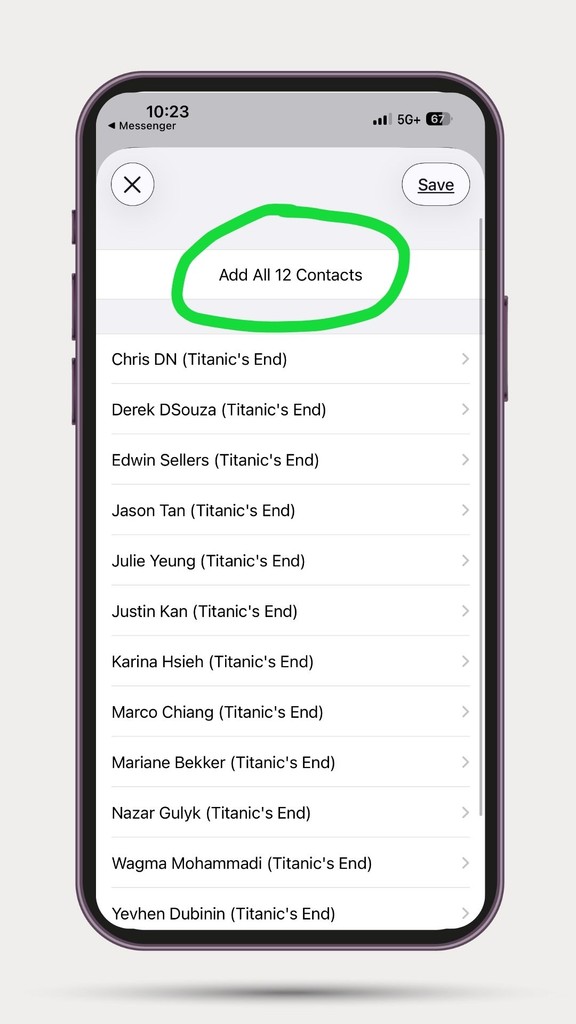
Simply paste your contact list, share the outputted file, and everyone adds each other in one tap.
Paste link
›
Map columns
›
Preview
›
Download VCF
1 Paste your Google Sheet link (with contact list)
Copy these column headers into row 1 of your Google Sheet:
Click Copy Headers → paste into Google Sheets row 1 → each header goes into its own column. First Name and Last Name are required.
Then: click Share → under General access select Anyone with the link → set role to Viewer → copy the link above.
2 Match your columns
3 Preview
Your contact file is ready
Download the VCF file and share it to add contacts.
📲 How to share contacts:
- Download the VCF file using the button above
- Share via AirDrop or iMessage — recipients tap the file and all contacts import instantly
⚠️ Note: WhatsApp and other messaging apps require recipients to download the VCF separately before importing. For best results, use AirDrop or iMessage where contacts import with one tap.